
How Company Fits with the Rest of Your Setup
EasyBiz organizes your business in layers. A Market sets the country-level context, and each Company sits within one Market as the legal business for orders and documents.
| Layer | What it represents | Example |
|---|---|---|
| Market | A country or region you sell into. Sets the currency, locale, and tax zone. | Singapore, Malaysia |
| Company | Your legal business, printed on receipts and used for tax filing. | Sunny Wash Pte Ltd |
| Business Unit | A distinct line of business you operate. | Laundry and Garment Care, Bag Repair |
| Sales Channel | A specific place customers place orders. | Main Shop POS, Online Store, Mobile Pickup |
Each Company belongs to one Market, and several Companies can share the same Market. Each Sales Channel belongs to one Company, and that is how an order picks up the right legal name, tax rate and sales period. The Business Unit is recorded on the order itself, so one Sales Channel can take laundry work and repair work, and each order still shows which line of business it came from.
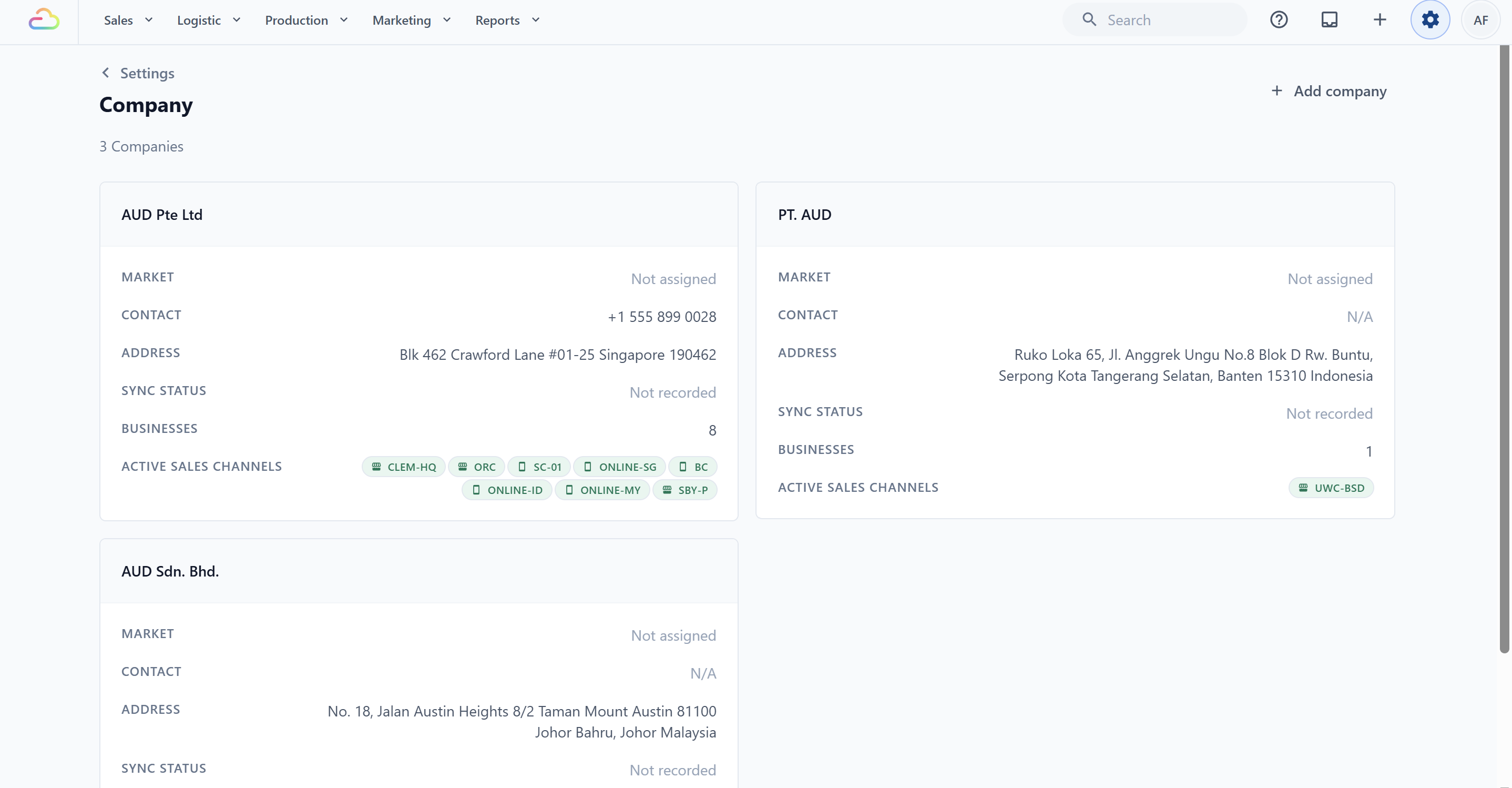
You'll find your Companies under ⚙️Settings → Company, where each one shows its name, market, contact, address, and the Sales Channels running beneath it.
What a Company Controls
Your Company drives:
The legal name, registration number, and tax number printed on every receipt and invoice
The registered address that appears on PDF invoices and tax exports
The contact info (phone, email, website) shown to customers
Whether Sales Tax applies, the rate, and what it is called on receipts
How amounts are rounded after tax
When each month's sales are closed and can no longer be edited
For Malaysia companies, the supplier details for LHDN MyInvois e-invoicing
When you change a setting on a Company, every Sales Channel underneath it picks up the change.
When You Need a Second Company
Add a second Company only if either is true:
You operate under a different legal business (a separate Pte Ltd, Sdn Bhd, or PT)
You sell into a different country and need separate currency, tax rules, and invoices
A different shop name or a different look is not a reason. For that, use a separate Brand Profile and a separate Sales Channel under the same Company. A different line of work is a Business Unit, not a Company.
FAQs
Does adding a second Company increase my subscription?
Not by itself. Your plan is priced on the products you run and the seats your team uses, not on how many Companies you have. Your cost goes up when the new business adds shops, seats or products.
Can two Companies use the same Market?
Yes. Several Companies can share one Market, for example two Singapore businesses in the same account. What you cannot do is change a Company's Market after it has been created.
If I rename my Company, do my old receipts update?
Anything printed or sent from now on shows the new name, including a reprint or a re-sent PDF of an old order, because documents read your current Company details at the moment they are produced. A receipt already saved against an old order keeps the old name until something on that order changes. Files you already downloaded or emailed keep the name they were made with. If you need the old name kept for audit, create a new Company instead of renaming.
I moved a Sales Channel to another Company. What happens to its past orders?
Past orders keep the tax rate, tax name and rounding they were created with — moving the Sales Channel does not restate them. What changes is the legal identity: any receipt or invoice produced from now on shows the new Company's name, address and registration number. Move a Sales Channel between months rather than mid-month, and close the old Company's sales period first.
I have one Pte Ltd but two shop brand names. One Company or two?
One Company. Give each brand its own Brand Profile and its own Sales Channel. A second Company is only for a second legal business.
Does each Company connect to its own QuickBooks or Xero file?
Accounting is mapped per Company, and each order syncs to the file that matches the Company it belongs to. Set the mapping up for every Company you add, or that Company's orders will not sync.
What is the difference between a Company and a Sales Channel?
A Company is who you legally are. A Sales Channel is where an order comes from, like a POS counter or an online store. One Company can have many Sales Channels.
Do I need to set up a Company before I can take orders?
Yes. A Company is required so EasyBiz knows the legal name to print and the tax rate to apply. Your first Company is created when you sign up, so finish filling it in before you go live.
What's Next
Continue to Creating and Configuring a Company to add or finish setting up your Company.