
Introduction to Company
In this article
A Company in EasyBiz is one legal business — the entity that appears on your receipts, your customer's invoice, and your tax filings. It holds your brand identity (logo, business name, theme color), your registered details (UEN, tax number), and the rules that shape every order total (sales tax and rounding). Most shops only need one Company, even if they run several outlets. You only need a second Company when you operate two genuinely separate brands or legal entities under the same EasyBiz account. Once your Company is set up correctly, the same details flow automatically into receipts, PDF invoices, and customer-facing pages.
Contents
Contents
How Company Fits with the Rest of Your Setup
EasyBiz organizes your business in layers. A Company is the top one.
| Layer | What it represents | Example |
|---|---|---|
| Market | A country or region you sell into. Sets the currency, locale, and tax zone. | Singapore, Malaysia |
| Company | Your legal business, the entity printed on receipts and used for tax filing. | Sunny Wash Pte Ltd |
| Business Unit | A type of service you offer under that Company. | Laundry & Dry Cleaning, Bag Repair |
| Sales Channel | A specific place customers place orders. | Main Shop POS, Online Store, Mobile Pickup |
Each Company belongs to one Market. Each Company can hold any number of Business Units and Sales Channels underneath it. For example, Sunny Wash Pte Ltd holds a Laundry unit and a Repair unit, with Outlet 1 POS and an Online Store under them. Change a Company setting and everything beneath it follows.
You'll find your Companies under ⚙️ Settings → Company, where each one shows its name, market, contact, address, and the Sales Channels running beneath it.
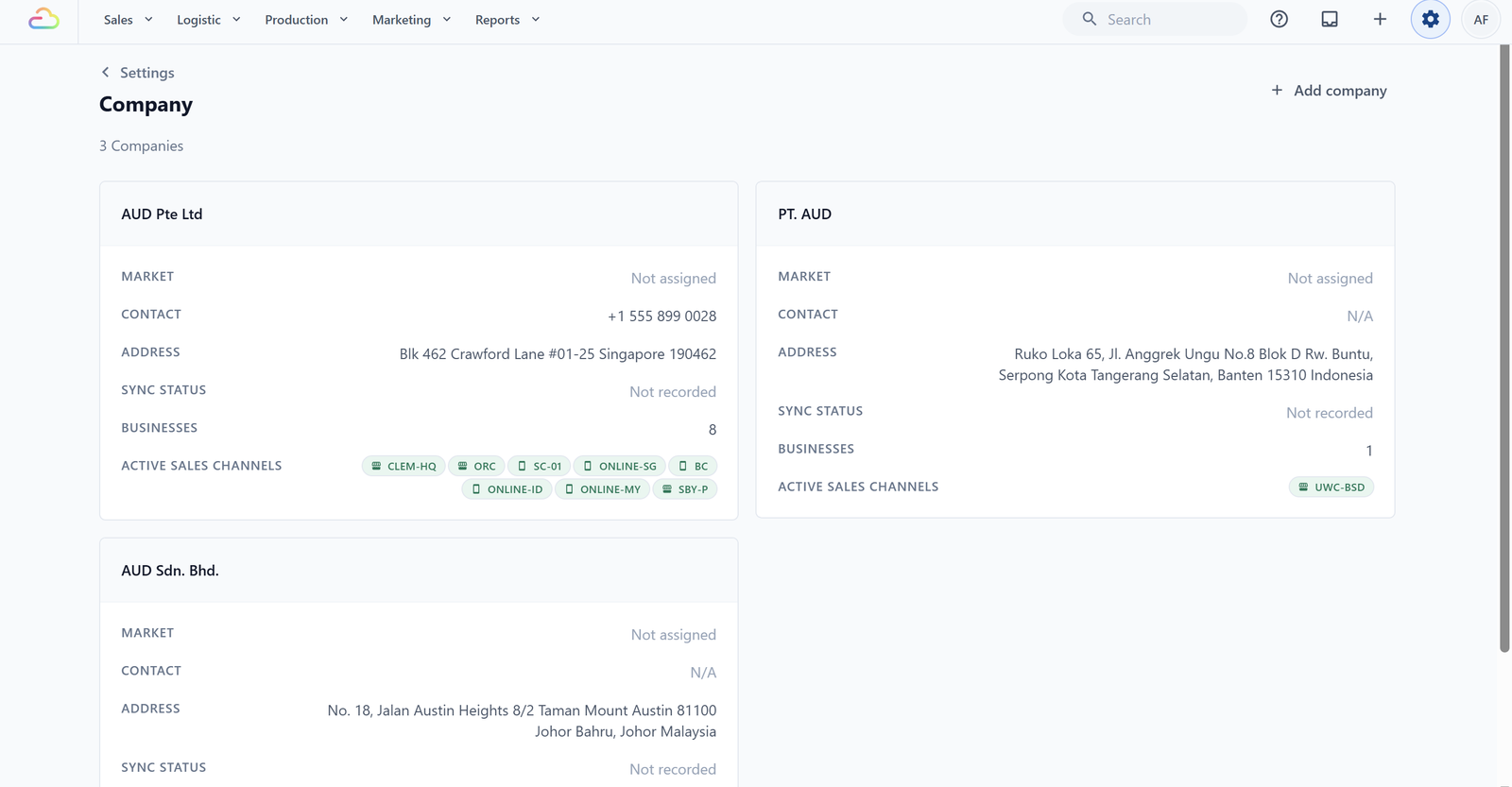
What a Company Controls
Your Company drives:
- The legal name, registration number, and tax number printed on every receipt and invoice
- The registered address that appears on PDF invoices and tax exports
- The contact info (phone, email, website) shown to customers
- Whether Sales Tax applies, the rate, and what it is called on receipts
- How amounts are rounded after tax
- For Malaysia companies, the supplier identifiers for LHDN MyInvois e-invoicing
When you change a setting on a Company, every Sales Channel and Business Unit underneath it picks up the change automatically.
When You Need a Second Company
Add a second Company only if either is true:
- You operate under a different legal entity (a separate Pte Ltd, Sdn Bhd, or PT)
- You sell into a different country and need separate currency, tax rules, and invoices
Different shop names or different services do not need a separate Company, those are Business Units or Sales Channels under the same Company.
FAQs
Do I need to set up a Company before I can take orders?
Yes. A Company is required so EasyBiz knows the legal name to print and the tax rate to apply. Your first Company is created when you sign up, so finish filling it in before you go live.
Can I run my whole business with just one Company?
Yes, and most shops do. One Company can run multiple shops, online stores, and service lines. Add a second only for a genuinely separate legal entity or market.
I have one Pte Ltd but two shop brand names. One Company or two?
One Company. Your legal entity is the Company, and your brand names are Sales Channels under it. You only need a second Company for a second legal entity.
If I rename my Company, do my old receipts update?
Yes, and this matters. Renaming changes how every past receipt and PDF invoice displays, because they read the live Company name when reopened. If you need the old name kept for audit, add a new Company instead of renaming.
What is the difference between a Company and a Sales Channel?
A Company is who you legally are. A Sales Channel is where an order comes from, like a POS counter or an online store. One Company can have many Sales Channels.
What's Next
Now that you understand what a Company is, continue to [Creating and Configuring a Company] to add or finish setting up your Company.
Give feedback
Up next
Creating and Configuring a CompanyAdd a new Company, fill in the legal details and address, and save each section as you go.
Read more